 CardRecovery
CardRecovery Support -
Preview Step Help
Step 3 - Recovered Pictures Preview
If you see the following messages below on recovered files preview:


Video/Audio - Preview JPG Only: Due to various video/audio file formats and codecs, in order to save system resource and keep CardRecovery running fast and effective, CardRecovery software has not built-in video/audio files player engine. It can preview JPG picture files only.

Raw Image - Preview JPG Only: Due to various image formats (especially for raw image formats from different camera brands), in order to save system resource, CardRecovery software has not built-in image viewer engine for picture formats other than JPG.

Corrupted Picture : The recovered picture may be corrupted and not recoverable in this case. Even in full version, the picture may be still corrupted and not recoverable.
CardRecovery has not built-in viewer for raw image formats, video files, audio files, we are sorry for any inconvenience it may have caused.
In most cases, they will be OK after you save them. If you are using an evaluation version and cannot determine whether it helps in this case, you may proceed with the purchase of CardRecovery, then save and check the results. If it does not work, and we are unable to help you solve the problem, you may request a refund from us. It is easy and fast.
Step 3 - Recovered Files Selection
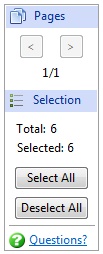
Pages Section: the [<] and [>] buttons allow users to quickly preview the previous page or next page of the recovered pictures. CardRecovery shows 6 pictures per page.
Selection Section: By default, all recovered files are selected by the software. If you need all of them, no need to click the Select buttons, or select them manually.
[Select All] button: Select all the recovered files
[Deselect All] button: Deselect all the recovered files