CardRecovery
CardRecovery Support -
Run CardRecovery on Microsoft Windows Vista and Windows 7
How to run CardRecovery on Windows Vista properly
As a data recovery software, CardRecovery requires administrator privilege when runs on Windows Vista.
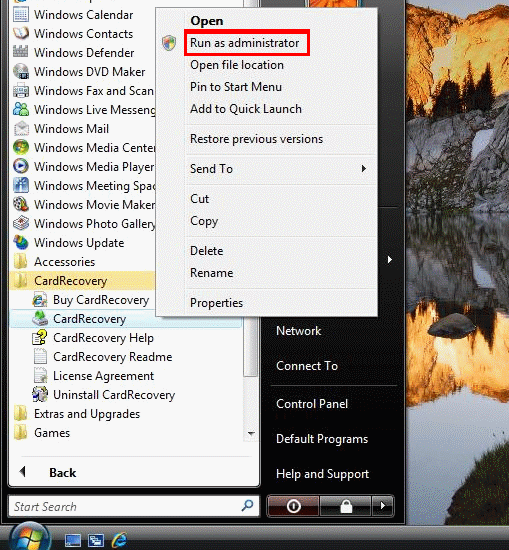
You need to use the following way to launch CardRecovery from your start menu.
1. Click you start menu -> Choose "programs" and locate CardRecovery group.
2. Right-click CardRecovery's shortcut and select "Run as administrator" from the context menu.
2. Click "Allow" on the popup window. CardRecovery will be launched with "Administrator" privilege and it can now scan and recover your data properly.
Without doing the above steps, CardRecovery may be denied to access your memory card by Windows Vista, and it will fail to scan your memory card and recover the data.