an XD Card (xD-Picture Card) is a digital camera memory card developed by Fuji Film, Olympus and Toshiba. Compared with other memory card types (SD Card, CF Card), it has a more compact size (20 mm × 25 mm × 1.7 mm). As other memory cards, it has various capacities from 16 MB to 8 GB. xD-Picture Card has four types including Normal, M, M+, and H. XD cards are widely used by digital cameras from FujiFilm to Olympus.
If you have deleted pictures from your camera's xd card, formatted the card by mistake, or the xd card was damaged, there's an error, or cannot be read for some reasons, Card Recovery software will help you retrieve the lost pictures and video files.
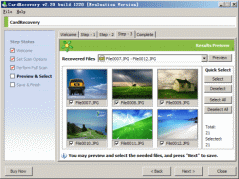
- Download Card Recovery and install it on your computer by following the instructions.
- Launch CardRecovery from the Start Menu. CardRecovery has a wizard style interface so it is very easy to use. During the first step in CardRecovery, you may select your camera brand and file types to recover. If you need to recover the video files besides photos, be sure to choose the video option as well. After you click "Next", Card Recovery will go to Step 2. The full and automatic scan on the XD memory card will start.
- After the scan completes (usually, it takes less than 20 minutes), Card Recovery will automatically go to Step 3. In Step 3, Card Recovery will display all the recovered pictures it found while scanning in thumbnail format. You may then select the desired pictures and save them.
In most cases, after the recovery completes, you will get back all or most lost or deleted photos from the xD Card using the software. Please note, the pictures that were written over are not recoverable. Also, some camera may wipe the pictures completely upon formatting or deletion, if this is the case, they are permanently lost and not recoverable. To confirm which pictures are recoverable or not, you may download and try the evaluation version first.
xD Card Recovery Requirement:
OS:
CardRecovery works with Windows platform (Windows 98, XP to Windows Vista, Windows 7). If you are using a Mac OS X computer, you need to use our Mac photo recovery software (CardRescue.com) to recover the images from the xD-Picture card.
Card Reader:
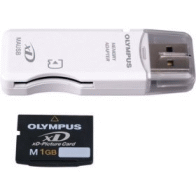 When you connect your digital camera to your computer, if it does not appear as a drive letter in "My Computer", an external XD card reader is needed. It will allow CardRecovery to access your memory card and recover the lost pictures. When you connect your digital camera to your computer, if it does not appear as a drive letter in "My Computer", an external XD card reader is needed. It will allow CardRecovery to access your memory card and recover the lost pictures.
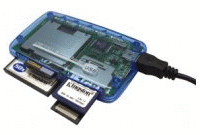
Some new computers may already have a built-in card reader. All-in-one (x in one) memory card readers or universal card readers also work.
|







 XD Card Photo Recovery - Tutorial