 Memory Card Drive Letter Help Memory Card Drive Letter Help |
| |
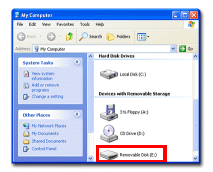 |
In order to access and recover the data from the memory card, almost all data recovery software (including CardRecovery software) requires the memory card to appear as a drive letter (or removable drive) in "My Computer". To determine whether or not your camera has already appeared as a drive, you may open "My Computer" (or "Computer" in Vista and Windows 7). |
| |
| If currently your camera cannot appear as a drive letter, you may try the following: |
| |
| Use your digital camera |
| |
| 1. Connect your digital camera to your computer USB port. |
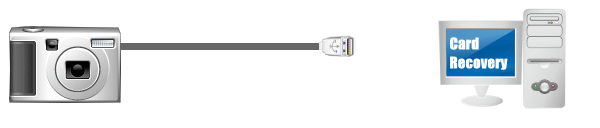 |
| 2. Turn on your camera, if a drive letter appears, that is normal. |
| |
| 3. If no drive appears, try to switch it to "Play" mode (also called "View", "Preview", "Playback Mode", "PC Mode", or "Review Mode"). |
| |
| 4. If unsuccessful, turn off your camera, disconnect it, and turn it on, then connect it to your computer again (turn it on before connection). |
| |
5. If still no success, please check whether or not your digital camera has an option like "Mass Storage" (also called "USB Mass Storage" or "Mass Storage Device"). If the option is available, please enable the "Mass Storage" option and it will allow your camera to appear as a removable drive (drive letter) upon connection with your computer. Enable the option and re-connect the camera to your computer.
You can also check your camera's manual and follow the instructions for attaching the camera to the computer. |
| |
| Or you can use a computer built-in or integrated card reader. |
| |
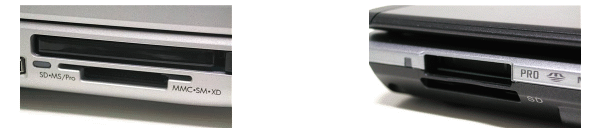 |
Many desktop or laptop computers now have built-in multiple flash card readers (laptops may just have a SD card reader). If there is a card reader in your computer, you may take your memory card out from your camera, and insert it to your computer card reader. In most cases, it will now appear as a drive letter (removable drive) in "My Computer".
Please note, not every computer has an internal memory card reader. Please check your computer manual or consult manufacturer support. Please do not insert the memory card into the wrong computer slots as it may physically damage the card. |
| |
| Or you can use an external card reader. |
| |
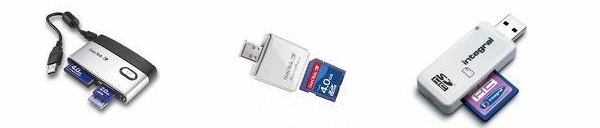 |
CardRecovery is very effective when recovering lost photos and movies from digital memory cards. But if your camera does not appear as a drive letter, and your computer does not have a built-in memory card reader, you need to prepare an external card reader (mostly USB) to allow CardRecovery (or other data recovery software) to access and restore the lost pictures and movies from the memory card.
You may find such card readers in local computer shops, super markets and stores like BestBuy, or Staples. You may also conveniently buy them online from Amazon, BestBuy or Wal-mart. The card readers can be found by searching "card reader", or "sd card reader" in the online shops.
External card readers are very cheap (usually less than $20 USD), but they are very useful, not only for photo recovery, but also for photo transferring from your camera to computer in your daily life. It is highly recommended for digital camera users. There are multi-card readers and single card readers. Multi-card readers can support different memory card types (e.g. SD card, CF card). A single card reader is smaller and can read only one card type (e.g. SD card). Typically, card readers use a USB 2.0 interface to connect with the computer.
|
| |
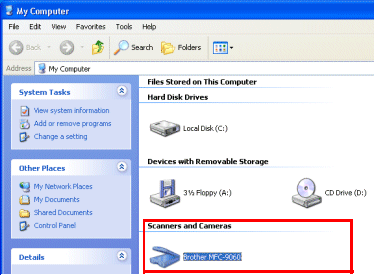
| Does Your Camera Appear in the "Scanners and Cameras" Section? |
If your camera can only appear in the "Scanners and Cameras" section of "My Computer", data recovery software is unable to access and recover the memory card. A card reader is still required.
|
| |
 |
| |
| Learn more about Card Reader from Wikipedia (Memory Card Reader) |
| |







