|
|
 How to Recover Photos from a Cell Phone - Tutorial How to Recover Photos from a Cell Phone - Tutorial |
| |
Recover Lost Photos from a Mobile Phone |
|
| Do you have lost photos from your mobile phone? You may still have a chance to get them back. CardRecovery software can recover deleted or lost photos and videos from most smart phones including Android, BlackBerry, Symbian and more (iPhone not supported). Visit CardRecovery.com on your Windows PC and Click the Download from the left menu to try the evaluation version now. It is fast and easy. |
|
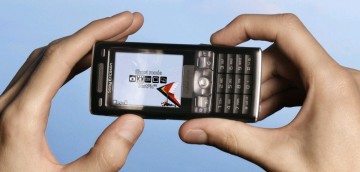
A mobile phone is also called cell phone and cellular phone in some regions. Almost all phones in the market are now equipped with a digital camera (camera phone). Just like digital camera users, cell phone or mobile phone users may delete their valuable pictures they have taken. This may happen when formatting the phone memory card by mistake, or damaging the memory card in the phone, or losing the photos on the memory card for some reason. |
|
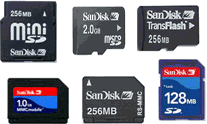
There are several memory card types used in cell phones such as Memory Stick Micro (M2), which is widely used in Sony-Ericsson phones. MicroSD, MiniSD, MicroSDHC, TransFlash card, RS-MMC are other popular phone memory card types used in Nokia, Motorola, and other phone brands.
|
Usually, there are two ways for a phone to save the pictures it takes - by internal phone memory and by external phone memory (memory card).
If the lost photos were saved in a phone external memory (memory card), it has a better chance to be recovered. You may take the memory card out of the phone, and then find a card reader to connect it to your computer's USB port. Almost all card readers will appear as a drive letter in "My Computer" of Windows when connected. You may use CardRecovery software to scan the drive letter and rescue the lost photos.
If your phone memory card is a MicroSD, you need a MicroSD card reader, OR a "MicroSD to SD Adapter", with a SD card reader. A MemoryStick Micro (M2) needs a Memory Stick Micro reader and so on. Card readers can be found from local computer shops or online shops like Amazon and Buy.com. They are cheap and useful. If you connect your phone directly to your computer, the phone memory card may appear as a drive letter. If this is the case, the card reader is not required.
If the lost photos were saved in the phone internal memory, you may try to connect your phone to your computer (mostly USB connection, or blue-tooth in some cases). If a new drive letter appears in "My Computer", it is great if the drive is just your phone's internal memory! You may use CardRecovery to scan the drive letter and try to locate and restore the lost pictures. Otherwise, if the internal memory (phone) cannot appear as a drive letter, as the internal memory cannot be taken out separately, it is not possible to recover the lost photos using software tools.
|
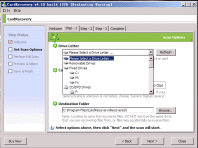 |
CardRecovery is easy to use. It has a step-by-step wizard to guide you through the whole recovery process. You may download CardRecovery from
http://www.cardrecovery.com/download.asp
Please note, CardRecovery works with the Windows platform only. Mac OS X version can be downloaded from www.cardrescue.com. If you have a Mac, you need to download and run CardRescue to recover your lost photos (JPG, TIF). CardRecovery/CardRescue can also recover lost video and movie files (e.g. AVI, MOV, 3GP).
CardRecovery can recover photos from a phone, and photos that were lost due to "delete", "format", or memory card damage/error. If you take the memory card out when you turn on or off your phone, the memory card may get corrupted. Also, battery shortage during reading/writing the phone memory, or other issues could also cause data loss on the memory card. Besides recovering photos shot using the phone camera, Cardrecovery also recovers the pictures, photos and images that are stored in the phone, saved from MMS, or copied from a computer.
CardRecovery supports most smartphones including Symbian, Android (to recover photos from Android phone, please click here), Windows Phone, and BlackBerry. But it does not support recovering lost photos from iPhones.
Please note, due to the nature of data recovery, it does not succeed in every case.
It is important that you do not take or save new pictures on the same memory card before you recover the lost pictures, because the newly added data may overwrite the deleted files and make them unrecoverable.
|
| |
|
|